

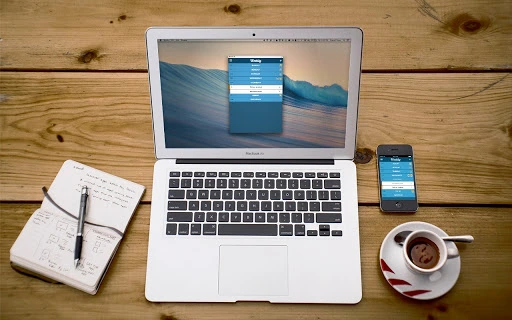
Description
Download Weekly – Chrome Apps, to-do list, task manager, Google Calendar, productivity tool
Overview
Weekly is a streamlined to-do list application designed to simplify daily task management for individuals seeking clarity and efficiency. Built with minimalism in mind, it allows users to create and complete tasks with just two taps and a single click, respectively. The software integrates directly with Google Calendar, enabling seamless synchronization across devices and platforms. This ensures that users can access their task lists from the Weekly app on Chrome, iOS, Android, or any Google Calendar client. Its core purpose is to reduce the friction often associated with task management tools, making it ideal for professionals, students, and anyone looking to maintain a structured daily routine without complexity. By leveraging existing calendar infrastructure, Weekly avoids the need for redundant data entry and promotes consistency across workflows. The software is particularly useful for users who already rely on Google Calendar for scheduling and wish to extend that ecosystem into their task planning. The developer, Weekly, has positioned the tool as a lightweight, intuitive solution for daily productivity, focusing on speed and accessibility over advanced features.
Key Features & Capabilities
- Two-Tap Task Creation: Users can create new tasks in just two taps, minimizing time spent on setup and encouraging consistent task logging.
- One-Click Task Completion: Marking a task as done requires only a single click, promoting quick progress tracking and a sense of accomplishment.
- Google Calendar Integration: The software synchronizes tasks with Google Calendar, allowing real-time updates and access from any device with a Google Calendar client.
- Multi-Platform Access: Available on Windows, Mac, Chrome OS, iOS, and Android, ensuring users can manage tasks across their preferred devices.
- Day-by-Day Task Management: Tasks are organized by day, helping users focus on immediate priorities and maintain a clear daily overview.
These features support practical use cases such as managing daily work assignments, tracking personal goals, or organizing study schedules. For example, a student can quickly add a reading assignment and mark it complete after finishing, with the update reflected instantly on their phone and laptop. Similarly, a remote worker can use Weekly to maintain a visual task log that aligns with their calendar events, reducing the risk of missed deadlines. The integration with Google Calendar ensures that no task is lost during device transitions or sync failures. While advanced features like recurring tasks or priority tagging are not mentioned, the simplicity of the core workflow suggests a focus on usability over complexity. This makes Weekly a strong candidate for users who value speed and consistency in their daily routines.
User Interface, Workflow & Performance
The user interface of Weekly is designed around simplicity and speed, with a clean layout that prioritizes task visibility and quick actions. Navigation is intuitive, allowing users to move between days with minimal effort. The workflow is optimized for rapid input and completion, aligning with the app’s promise of minimal friction. Task lists are presented in a chronological, day-by-day format, which supports focused planning and review. The developer did not specify resource usage details, so exact performance metrics such as CPU or RAM consumption remain unknown. However, based on the app’s lightweight nature and file size of 10.2 MB, it is likely to operate efficiently on most modern systems. Stability is expected to be consistent, especially given its reliance on Google Calendar’s robust infrastructure for synchronization. The application appears to be designed for background operation without significant system impact. Users can expect responsive interactions, though actual performance may vary depending on network conditions and device capabilities. No reports of crashes or slowdowns were provided, but general software behavior patterns suggest reliable operation under normal conditions.
Compatibility & System Requirements
Weekly is compatible with Windows, Mac, Chrome OS, iOS, and Android, making it accessible across a wide range of devices. The software is available as a desktop application and mobile app, supporting both desktop and mobile workflows. The installation size is 10.2 MB, indicating a lightweight footprint. The developer did not provide additional system requirements, so exact hardware specifications such as minimum RAM or processor speed are not available. Compatibility information was partially provided, with support confirmed for major operating systems. Users should ensure their devices meet the standard requirements for running web-based applications and Google Calendar clients. No specific version requirements were listed, but the latest version (1.0.0) is recommended for optimal functionality. The software leverages Google’s cloud infrastructure, which reduces dependency on local system resources and enhances cross-device consistency.
Pros and Cons
Pros
- Minimalist design with fast task creation and completion
- Seamless integration with Google Calendar for real-time sync
- Available on multiple platforms including Windows, Mac, iOS, Android, and Chrome OS
- Lightweight installation at only 10.2 MB
- Free to use with no hidden costs
Cons
- Limited feature set compared to advanced task managers
- No official information on system requirements or performance metrics
- Relies entirely on Google Calendar, which may be a limitation for users without a Google account
- Advanced customization options not disclosed
- Dependence on internet connectivity for full functionality
FAQ Section
Is Weekly compatible with all versions of Windows and Mac?
Weekly supports Windows and Mac operating systems, but the developer did not specify exact version compatibility. Users should ensure their system meets standard requirements for running modern web applications.
Is Weekly safe to download and use?
As a tool that integrates with Google Calendar, Weekly operates through secure channels. The developer has not made public claims about security protocols, but its reliance on Google’s infrastructure suggests a secure data handling process.
How often does Weekly receive updates?
Information on update frequency was not provided. The current version is 1.0.0, and users are encouraged to check for updates through the official distribution channels.
What type of license does Weekly use?
Weekly is offered as a free software tool. The developer did not specify the license type, but the absence of a paid model suggests a freemium or open-access approach.
Can I use Weekly offline?
Weekly requires an internet connection to sync tasks with Google Calendar. While the app may cache data locally, full functionality depends on active connectivity.
Final Thoughts + CTA
Weekly delivers a refreshingly simple approach to daily task management, focusing on speed, consistency, and seamless integration with Google Calendar. Its minimal interface and efficient workflow make it ideal for users who want to reduce task management overhead without sacrificing productivity. While it lacks advanced features found in other task managers, its strength lies in its simplicity and cross-platform accessibility. For individuals already invested in the Google ecosystem, Weekly offers a natural extension of their daily planning. The free price point and lightweight design further enhance its appeal. If you’re looking for a no-frills to-do list tool that works across devices and integrates smoothly with your calendar, Weekly is a compelling choice. Download Weekly now to experience a smarter, simpler way to manage your daily tasks.
Download Weekly now
Guides & Tutorials for Weekly - Simple Todo List App for Chrome
How to install Weekly - Simple Todo List App for Chrome
- Click the Preview / Download button above.
- Once redirected, accept the terms and click Install.
- Wait for the Weekly - Simple Todo List App for Chrome download to finish on your device.
How to use Weekly - Simple Todo List App for Chrome
This software is primarily used for its core features described above. Open the app after installation to explore its capabilities.
User Reviews for Weekly - Simple Todo List App for Chrome 0
No reviews found





